
Every cable, closure and strand. One map.
FiberForge maps your plant down to the splice, traces any fiber from the customer's ONT back to its OLT port, and brings your VETRO network over intact. Built inside a rural fiber ISP, for its own crews, and priced like one.
Month to monthNo annual contractExport your data any time
We were paying more for mapping than for bandwidth.
We run a rural fiber network. Between a fiber design platform and a pole data platform, our mapping bill had passed what we paid for the internet bandwidth we sell.
So we built the tool our own crews needed: a map that knows every splice, a trace that follows the actual strands, and an import that doesn't need a consultant. FiberForge runs our network today. Our splicers and designers shaped it, and they test every release.
 Built by an ISPfor ISPs
What our mapping stack cost, per month
Our own numbers. FiberForge covers the design, splicing and pole-profile work we used those tools for; it doesn't do pole loading analysis. We'll run your numbers with you on the demo call.
Designed around the splice, not just the cable.
Most mapping tools stop at the route. FiberForge carries the network down to the tube and strand, so the office, the splicer and the field tech are all reading the same record.
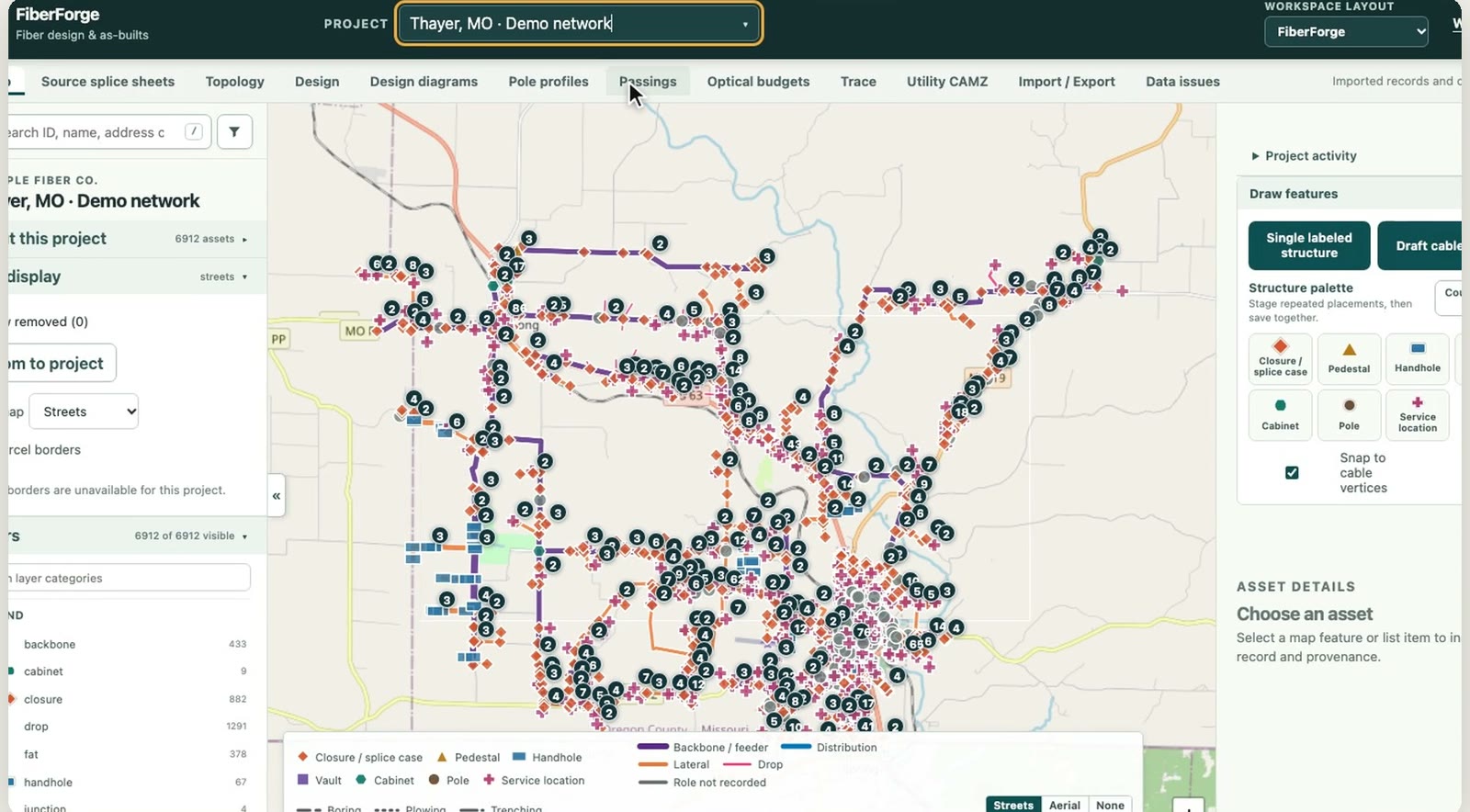
Your whole plant on one map.
Cables, closures, splitters, service locations and drops over satellite imagery or streets. Type a closure ID or an address and the map flies there with the record open.
- Every layer counted and switchable: backbone, laterals, drops, cabinets, handholes, poles
- Search by ID, name or address across the whole network
- Multi-org with roles and Google sign-in for your office and crews
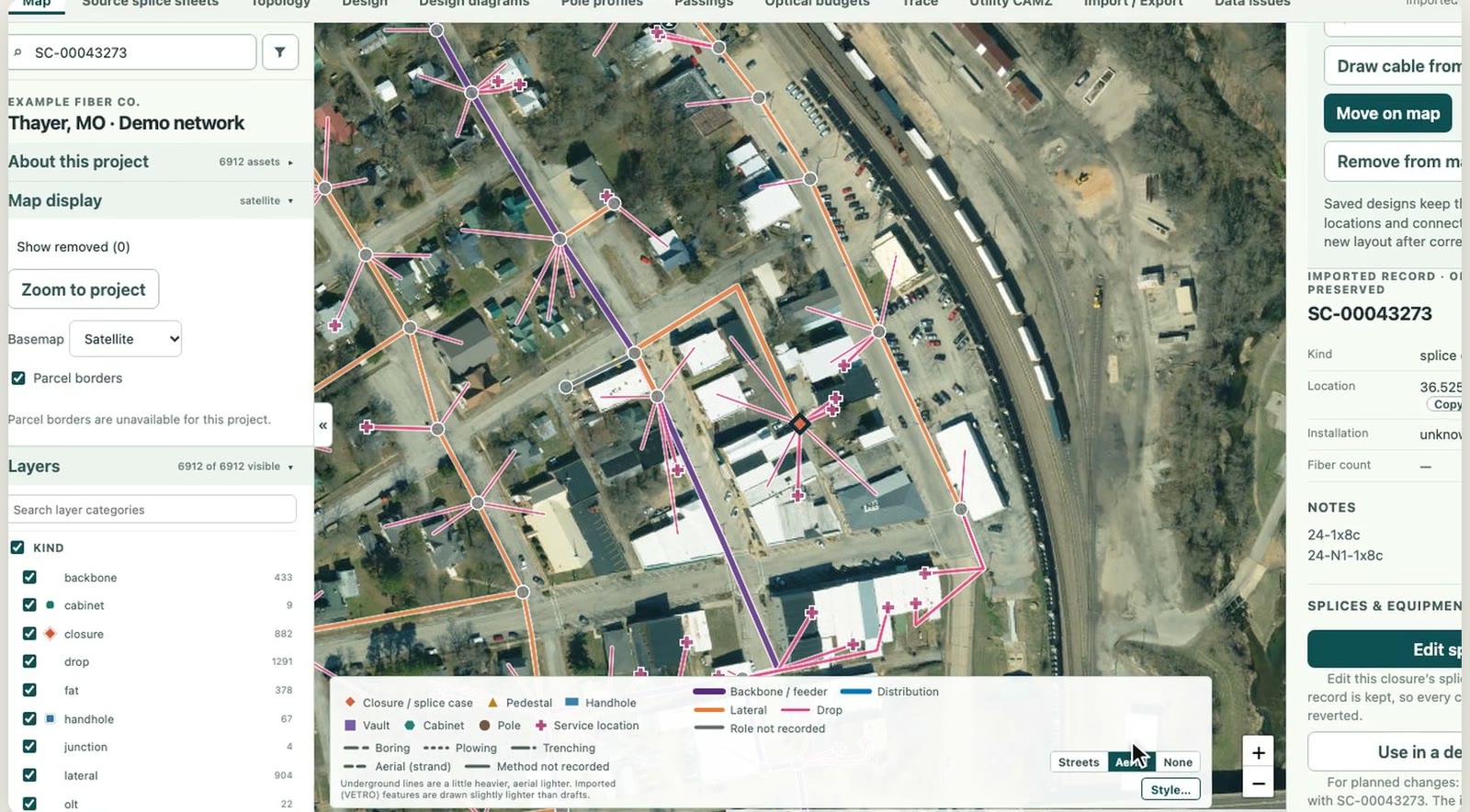
A splice editor your splicers will recognize.
Open any closure and see each cable side, buffer tube and fiber in standard color code. Click a fiber and its path lights up; keep clicking and it follows you from closure to closure.
- Sides, tubes, fibers and splitters in one view, edited in place
- Follow-a-fiber across closures without flipping between sheets
- Splice report PDFs with side-by-side diagrams, a summary page, and fiber and splitter tables
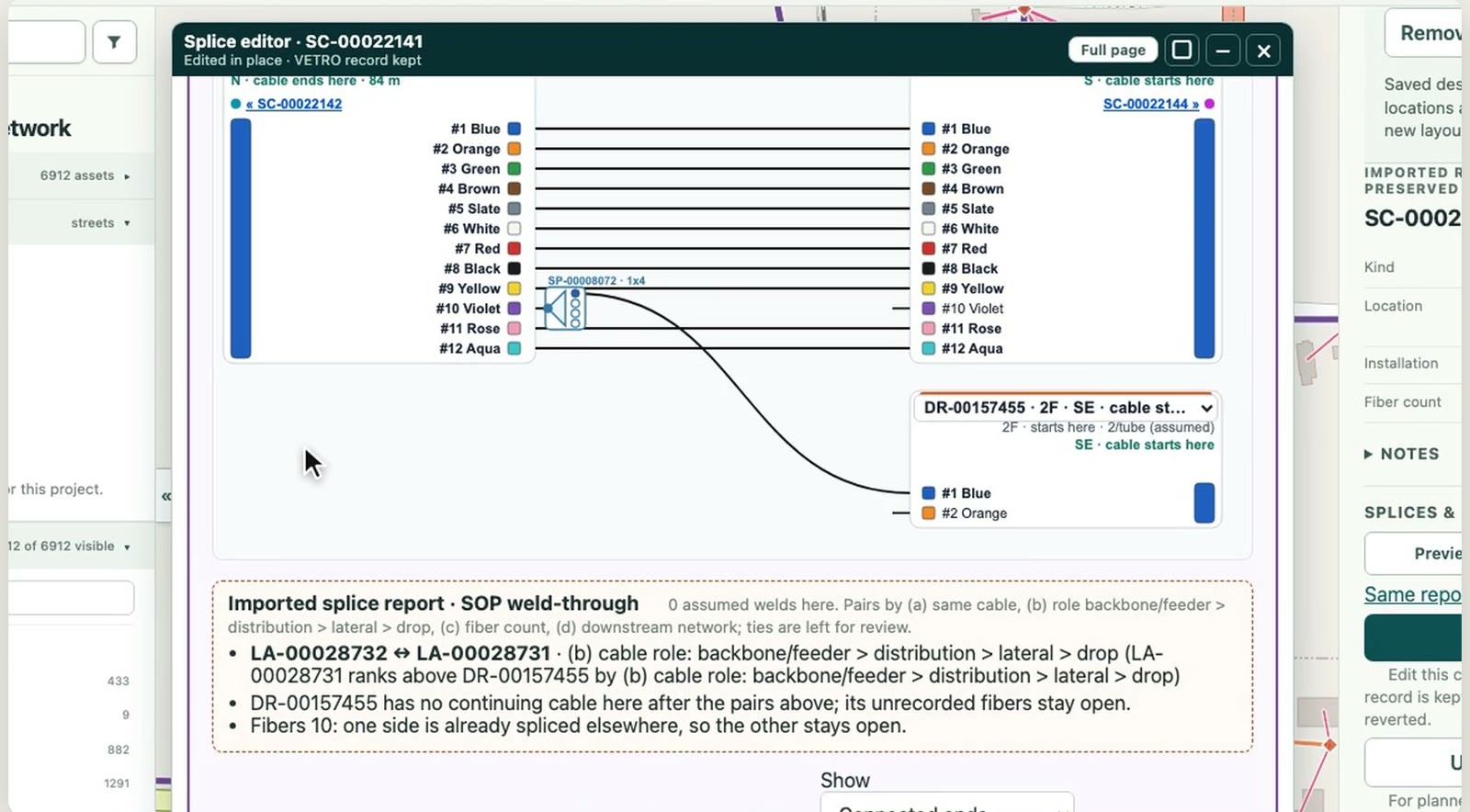
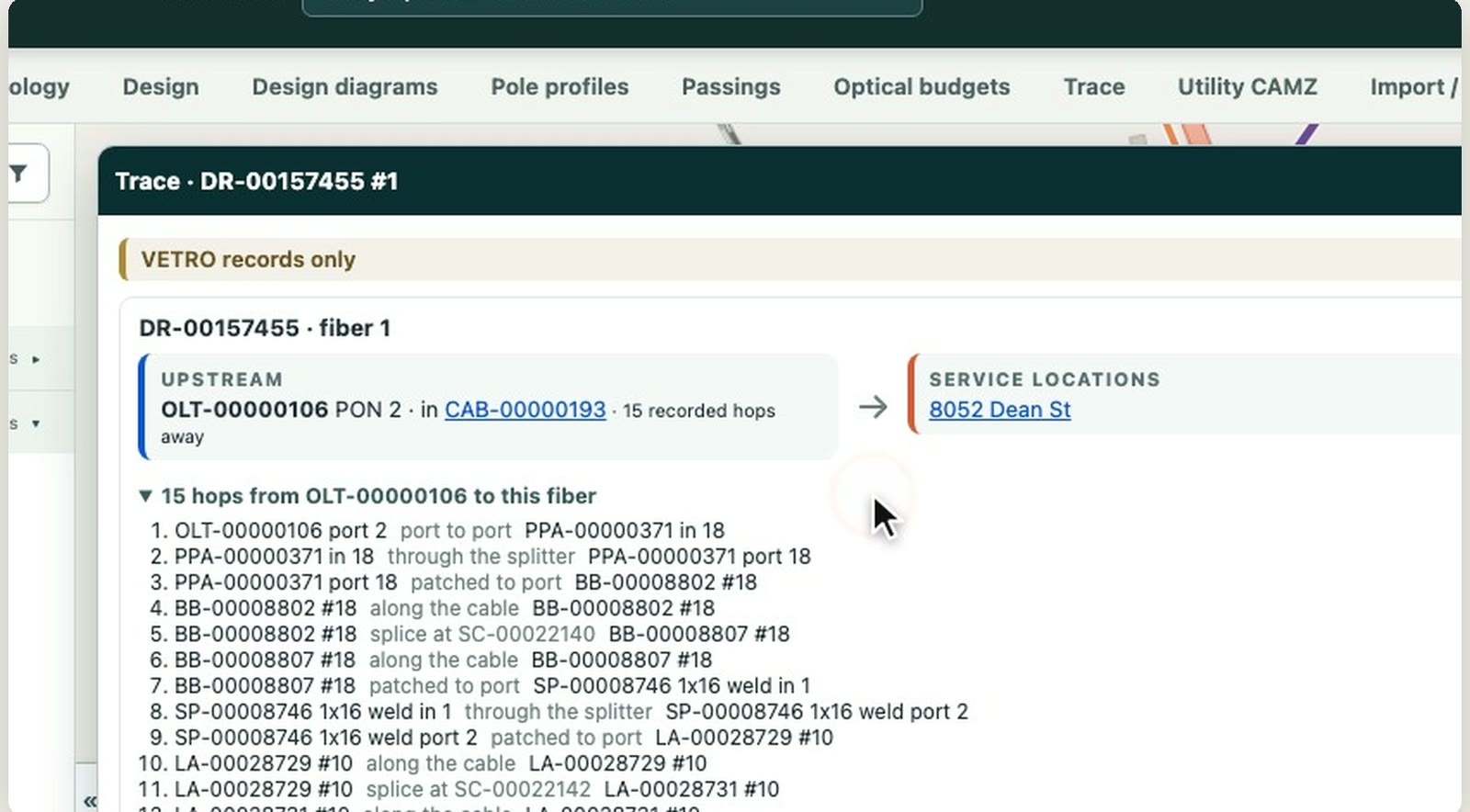
Trace any fiber, in either direction.
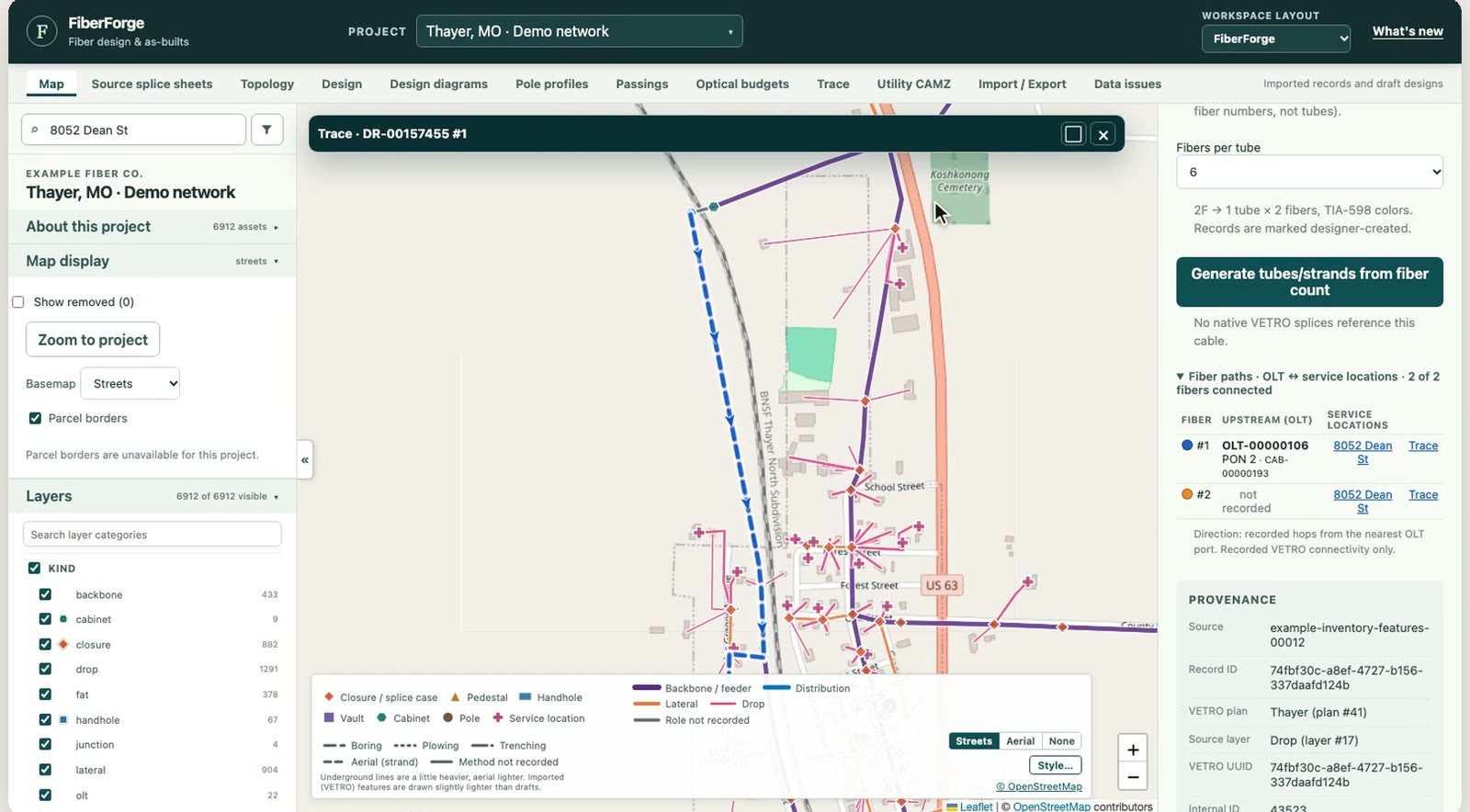
Start at a customer's ONT or service location and follow the light back through the drop, every splice, splitter and patch panel, to the OLT PON port. Or start at a PON port and see every home it lights.
- Hop-by-hop list and the path drawn on the map, with direction
- Optical library and loss budgets for checking a path before the crew rolls
- Works on imported VETRO records from day one
Pole profiles on the same map as the fiber.
Bring poles in from KMZ, CSV or a Katapult KMZ export. Drop field photos on them, measure attachment heights from the photo, and check midspan clearance against the pole owner's minimums.
- Photos placed by their GPS tags, measured with lens-distortion correction and a survey-pole calibration
- Existing and proposed attachments with a midspan clearance check
- Utility package PDF covering many poles at once
Pole profiles are for attachment heights and clearance. FiberForge doesn't do pole loading or NESC compliance analysis; keep your loading tool for that.
Illustration. Values are examples.
And the parts that make it a system of record.
VETRO import
Bring your existing network over with its original IDs, closures and splices. Nothing gets renamed.
As-built revisions
Every change is a revision you can review, undo or restore. Imported records are never overwritten.
Splice report PDFs
Side-by-side splice diagrams, a summary page, and fiber and splitter tables, ready to hand a splicer.
Open formats, both ways
KMZ, KML, SHP, GeoJSON, CSV and DXF import and export. Your network is yours.
Optical library
Connector, splice and splitter losses in one library, feeding a loss budget for any traced path.
Orgs and roles
Separate organizations, role-based access and Google sign-in for staff and contractors.
Find anything
Closure IDs, cable names, street addresses. Type it and the map flies there with the record open.
Staking sheets Coming next
Construction sheets generated from the design. In development with our own crews.
Short videos, real workflows.
Each one walks through a single job on our demo network. They double as training for your crew.
An honest look at the alternatives.
Good tools, built for different jobs. Here's where FiberForge fits, and where something else is the better pick.
| Product | Known for | How FiberForge differs | Pick it instead if… |
|---|---|---|---|
| FiberForge | Fiber map, splice editor and end-to-end trace for operating networks, built by an ISP. | Published monthly prices, no annual contract, one-step VETRO import. | You run or design fiber and want the as-built record down to the strand. |
| VETRO FiberMap | Widely used cloud fiber mapping and network management. | Map, splice editor and trace for day-to-day work, at a published monthly price. Your VETRO data imports directly. | You depend on VETRO-specific integrations or workflows we don't cover yet. |
| Katapult Pro | Pole data collection, make-ready engineering and pole loading. | Pole profiles, photo measurement and clearance checks live next to the fiber. Imports Katapult KMZ. | You need pole loading analysis or a dedicated field-collection app. |
| MapItRight | Lightweight fiber mapping at a low entry price; markets staking sheets. | Deeper splicing and ONT-to-OLT trace. Staking sheets are coming next. | Budget is the deciding factor and you need staking sheets today. |
| 3-GIS | Enterprise fiber management built on Esri ArcGIS. | Standalone, no GIS platform to license or administer. Takes SHP and GeoJSON in and out. | Your organization is standardized on Esri. |
| IQGeo / Comsof | Enterprise network management, plus automated FTTx planning and design. | Focused on the operating as-built record, without an enterprise rollout. | You're a large operator or need automated network design at scale. |
| Biarri FOND | Automated, cost-optimized fiber network design. | Not an auto-design engine. FiberForge keeps the network you build accurate after design. | You're planning a large greenfield build and want optimized designs. |
Product names are trademarks of their owners. Descriptions reflect each vendor's public positioning as we understand it; tell us if something's out of date and we'll fix it.
Move your network before your next renewal.
We moved our own network this way. Most of the work on your side is a file export.
Export your plans
Download your plans and splice data from VETRO. We send step-by-step instructions.
We import them
Features, closures and splices come in with their original IDs, so nothing gets renamed.
Your crew checks it
Walk a few closures and traces with your splicers. Anything odd is flagged under Data issues.
Cancel the renewal
Run on FiberForge month to month. Keep your old exports as a backup.
Published prices. Monthly billing.
Priced by the number of service locations on your map. Every plan includes the full map, splice editor and trace.
Starter
Small ISPs and first fiber builds
Billed monthly. Cancel any time.
- Up to 5,000 service locations
- 5 users
- Map, splice editor, trace and loss budgets
- VETRO, KMZ, SHP, GeoJSON, CSV and DXF import
- Splice report PDFs
- Email support
Growth
Growing networks with in-house design
Billed monthly. Cancel any time.
- Up to 25,000 service locations
- Unlimited users
- Everything in Starter
- Pole profiles, photo measurement and clearance checks
- As-built revisions with undo and restore
- Staking sheets when released Coming next
Network
Multi-market operators and consolidators
Monthly, sized to your footprint.
- Unlimited service locations
- Multiple organizations and markets
- Everything in Growth
- Migration from several systems
- Priority support
Before you switch
Something not covered? Ask on the demo call, or write to us.
Do we lose anything when we import from VETRO?
No. Imported records keep their original IDs and properties, and FiberForge never overwrites them. Your edits are kept as revisions alongside the original, so you can always compare against what came in.
What does onboarding include?
We import your network (VETRO, KMZ, shapefiles and the rest), check it with you, and train your crew on your own plant. It's a one-time fee quoted per network, based on its size and how many systems the data comes from.
Does FiberForge do pole loading or NESC analysis?
No. Pole profiles cover attachment heights, photo measurement and midspan clearance against the owner's minimums, and produce a utility package PDF. For pole loading analysis, keep using your loading tool.
Does it work for aerial and underground?
Yes. Cables, closures, handholes, vaults and poles all live on the same map, and pole profiles cover the aerial side.
Who built FiberForge?
An ISP that got tired of its mapping bill. Our own splicers and designers use it every day and test every release.
When are staking sheets coming?
They're in development with our construction crews. Growth and Network customers get them when they ship.
Can we leave?
Any month. Export your network in standard formats and you're done. There's no annual term and no exit fee.
See your own network in FiberForge.
Send a VETRO export or a KMZ ahead of the call and we'll walk through your own plant, not a canned demo.
- 30 minutes with someone who runs a fiber network
- Your closures, your splices, your traces
- A straight answer on cost, including onboarding
Already a customer? Log in at app.fiberforge.io